
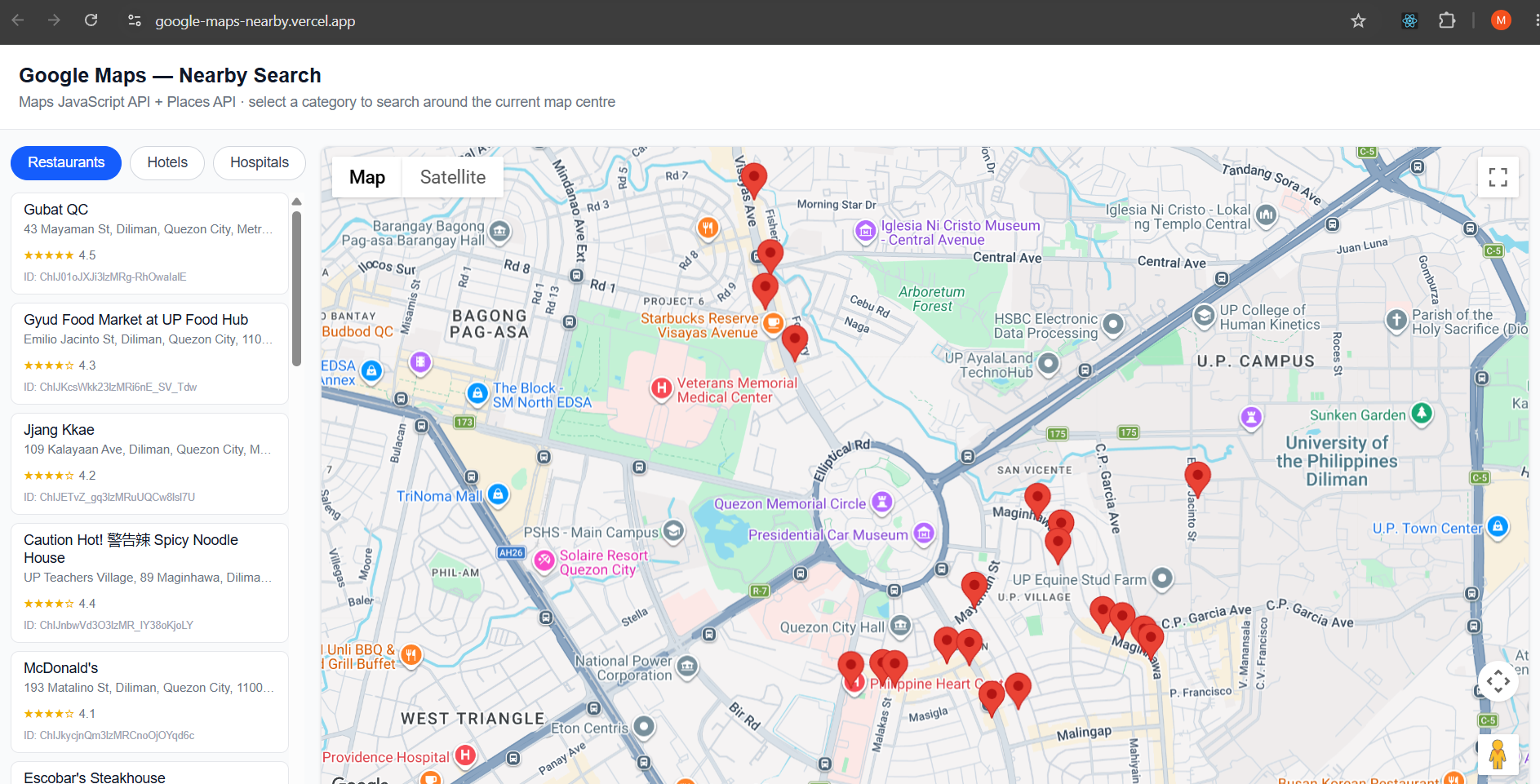
I built a small Google Maps proof of concept to explore how Google Maps Platform can be integrated into a modern Next.js application.
The goal wasn't to build a full mapping application, but to understand the integration from the ground up—from displaying an interactive map to querying nearby places and presenting the results to users.
[View Live Demo] [View Source]
Starting with the Map
I started by integrating the Google Maps JavaScript API into a Next.js application using TypeScript.
The first step was configuring the Google Maps API key through environment variables rather than hardcoding it into the application.
Once the API was configured, I created a reusable map component that initializes the map with a default location and allows users to pan and zoom.
This gave me a simple foundation to understand how the Google Maps API interacts with a React-based application.
Adding Nearby Search
After getting the map working, I moved on to Google Places.
I added three simple search categories:
Restaurants
Hotels
Hospitals
The search uses the map's current center as the geographic reference point. When a category is selected, the application performs a nearby search and retrieves matching places.
The returned results are then displayed in two ways:
As markers on the map
As cards in the results panel
This helped me understand the relationship between geographic coordinates, Places API queries, and map markers.
Connecting the Map and the Results
One of the interesting parts of the POC was connecting the data returned by the Places API with the visual map.
Each place returned by the search can be represented as a marker using its latitude and longitude. Selecting a marker can then be associated with the corresponding place information displayed in the application.
This created a simple flow:
Map Location → Nearby Search → Places API → Results → Map Markers + Place Cards
What I Learned
The POC gave me practical experience with several concepts that aren't immediately obvious when simply embedding a map:
Integrating Google Maps Platform with Next.js
Managing third-party API configuration
Working with geographic coordinates
Performing nearby place searches
Converting API results into interactive map markers
Connecting map interactions with React UI
Handling asynchronous API operations
Separating reusable map and place components
More importantly, building the POC helped me understand how a location-based feature can be structured rather than treating Google Maps as simply a visual component.
Technology
Next.js · TypeScript · React · Tailwind CSS · Google Maps Platform · Places API
The project is intentionally small, but it provides a foundation for extending the application with features such as location search, route planning, geolocation, and more advanced location intelligence.